

Back again – I’ve been on hiatus the past few months; I finally got my puppy! So I’ve been working on being the best dog-mom I can be… which has also translated to being a little bit of a lazy blogger! I’m working on some new content for master data and the EPM Cloud, so stay tuned!
Today’s quick tip is something that I can’t even find in the DRM admin guide…re-ordering Hierarchy Groups, Property Categories, and Validations.
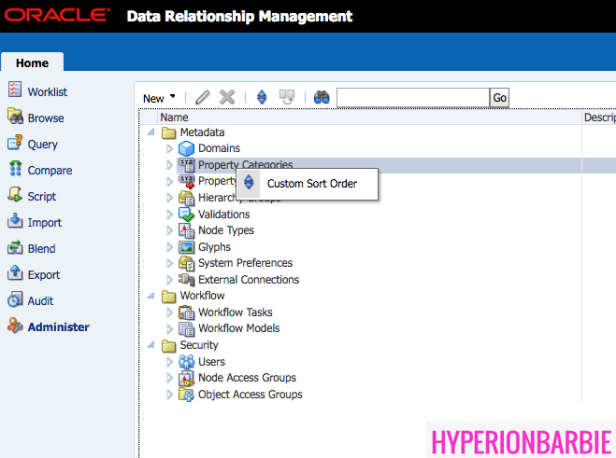
If you navigate to the Administer menu, you can see the categories of DRM Objects for the application. If you right-click on the main categories – a menu item will appear, “Custom Sort Order”:
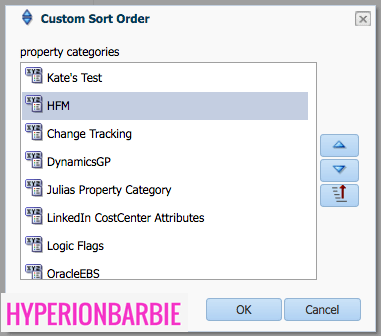
From there, another window will open which allows you to order the components, and even includes the quick “alphabetize” button:
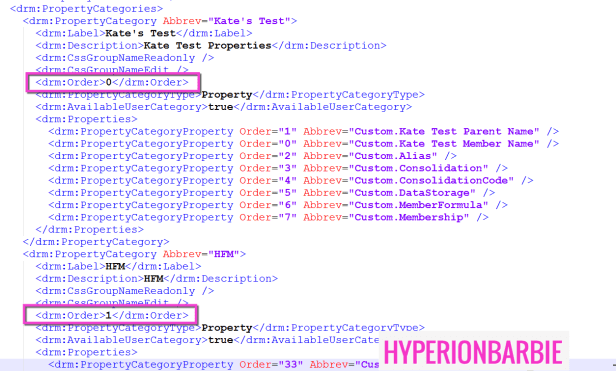
If you look on the back-end XML, you can see if you extract property categories, there is an attribute called “Order” that drives the order of the Property Categories (or the Hierarchy Groups and Validations). This is what is being updated with this Custom Sort Order window, and drives the order of the items:
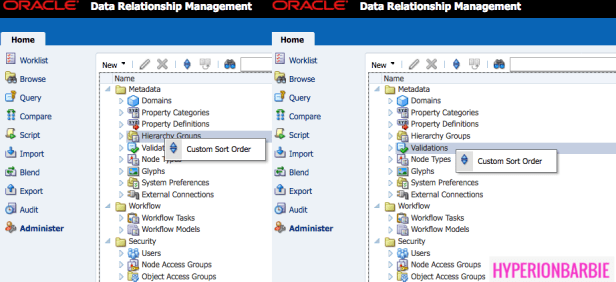
For Hierarchy Groups & Validations as well:
 oraclebarbie.com
Good information…
Hi, I really loved reading this article. By this article i have learnt many things about ODI topic, please keep me updating if there is any update.
Hyperion Planning Online Training
Hyperion Planning Classroom Training
Hyperion Planning Training