
At first glance, the title of this blog might seem a bit sad. Talking about orphans along with enterprise software isn’t something you hear every day.
However, if you are a former Oracle DRM user, you may be familiar with this term. But essentially, the concept of an “orphan” in Oracle DRM and Oracle EDM and the traditional word “orphan” is the same: a member (of society or your data set) without a parent.
The traditional nomenclature for talking about hierarchical data, like that we use in EDM or for dimension / reporting purposes in EPM and beyond, is familial in nature; much like the ancestry of living things. So it makes sense for the term “orphan” to be used. As a reminder, here’s some of the traditional terms we use to describe hierarchies and dimensions:
| Hierarchy and Dimension Terms | |
| Member / Node | A data point in the hierarchy |
| Descendant | All members below the selected member, excluding the member |
| Ancestor | All members above the selected member, excluding the member |
| Sibling | All members are the same level in the hierarchy, excluding the selected member |
| Parent | The member in the level above the selected member |
| Children | The member in the level immediately below the selected member |
| Level 0 Descendants | All descendants of the selected member that have no children; where data is loaded typically in EPM, ERP, or other reporting applications |
So if we want to understand orphans, it’s the members or nodes that do not have any relationships to other pieces of data. They’re disconnected, they do not have parents, ancestors, or siblings. They do not have child nodes. They are pieces of data, merely floating around in the EDM Node Type of which they’ve been created.
To understand more about how “orphan” nodes are created, we need to remind ourselves about the difference between the Remove and Delete actions in Oracle EDM.
Remove vs. Delete Actions in EDM
As a reminder, EDM allows you to structure data in two different ways: 1) Hierarchy and 2) List. Hierarchies have relationships and Lists to not. This will be very important in just a bit.
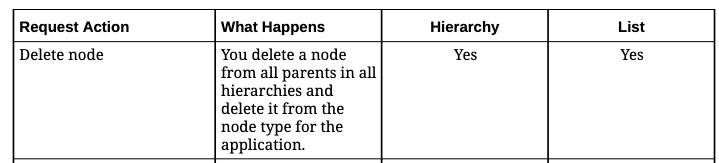
Also in EDM, there are distinct Actions that a user can perform on a request: Add, Move, Insert, Remove, Reorder, Delete, etc. The prior two bolded Actions are often confused: don’t they mean the same thing? Both are wanting to clear data from the data set, but they have very different meanings within the context of EDM. Here’s the clear distinction:
Delete: Deletes the data from all instances of parents in Hierarchies or within the Lists it exists, for a defined Node Type. Or how Oracle writes it:
Remove: Removes the data from a specific parent in a Hierarchy.
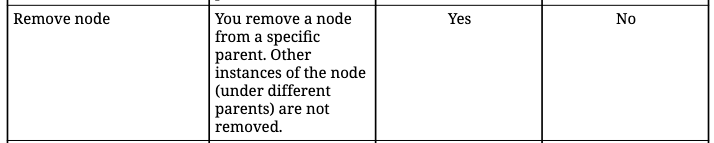
When you are in a List, the data does not have any relationship to one another. The List is a collection of the data, but relationships are not required. So, by default, Remove is not a valid Action on List viewpoints. Because there’s no parent to remove it from. You can only Remove on Hierarchies – and only for the parent on which you are using the action. (You can also Delete on Hierarchies).
But what if there’s only one instance of the member, and you Remove it from its only parent? This is how “orphans” occur.
How to Find and Fix Orphans
Occasionally, things happen where members are removed from their only parent and become an “orphan” – but what if we want to reunite this data with the prior or a new parent? There’s a fix for this.
Oracle EDM’s Query feature allows you to search viewpoints for queries – essentially searching the Viewpoint’s Node Type and then providing you a list of members/nodes that are in the Node Type but not visible in the Hierarchy Set. Then, you can create a request to create the parent/child relationships desired.
To start, I’m going to Remove my P_000 No Product member from my hierarchy, making it an orphan:

Now that it’s Removed from my hierarchy, I can go do a search to retrieve it and Insert it back. I start by going to the Query feature, and then selecting the dropdown from All Nodes to Orphan Nodes:
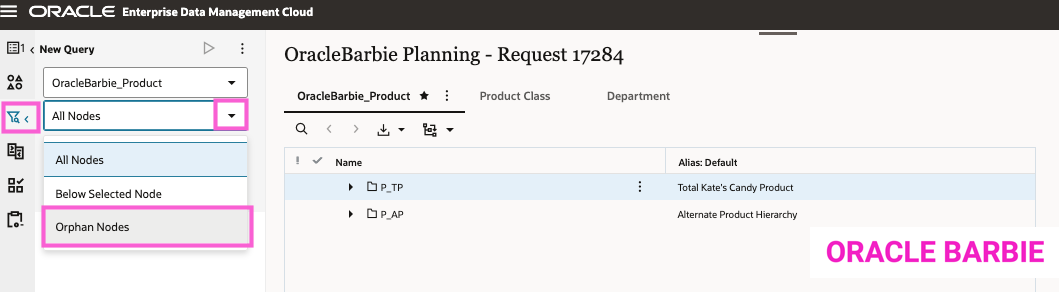
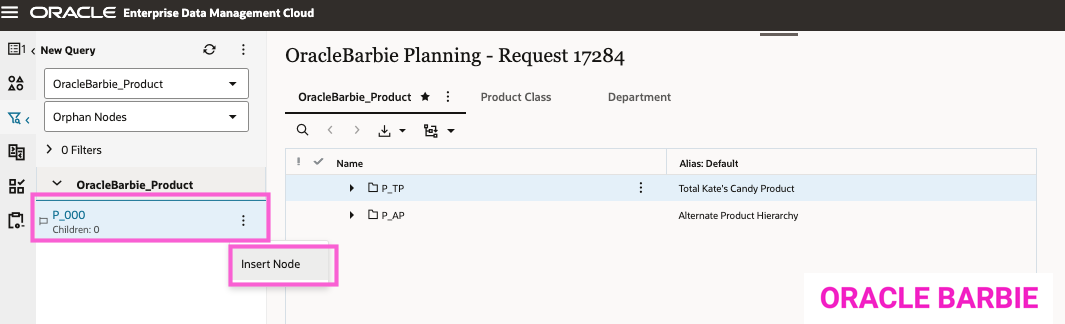
The result shows me my “orphan” P_000 No Product. It also notes that it does not have any children. This is also interesting to note: “orphans” don’t have parents – but they can be parents; and also lug their children along into orphan-dom. I am given an option to Insert the Node back into the hierarchy (note, I open a New Request prior to selecting this):
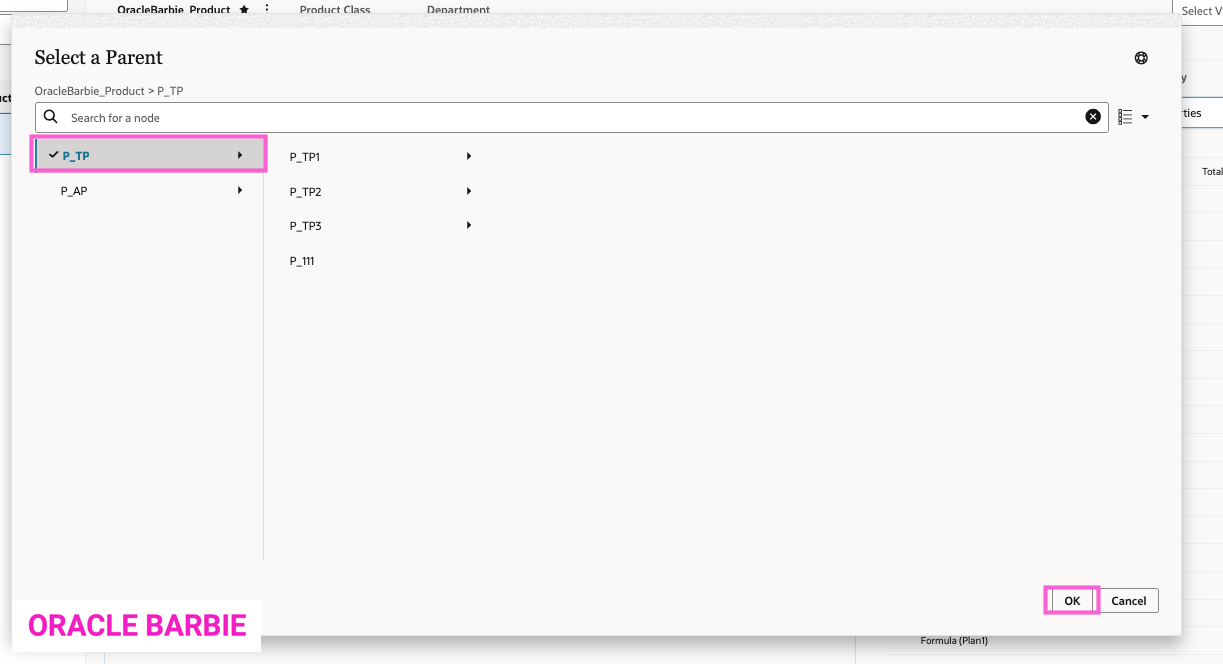
The “Select a Parent” window prompts me to find P_000 a new home, I select P_TP Total Kate’s Candy Product.
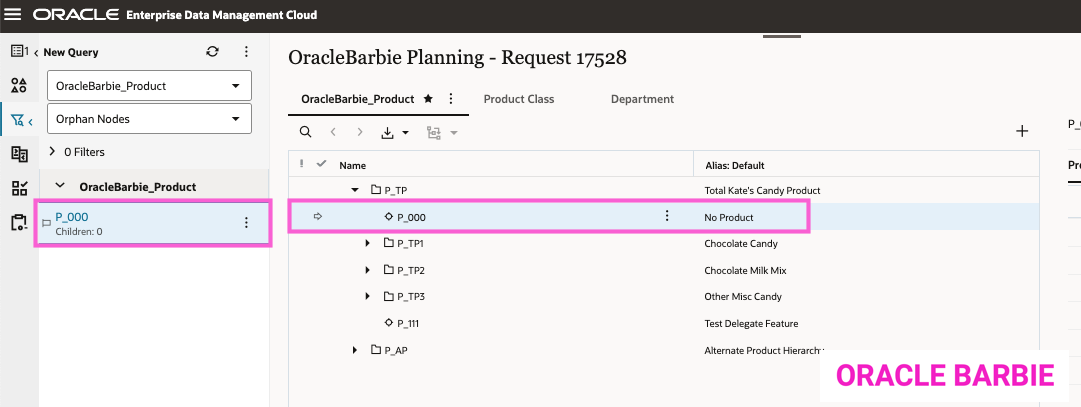
The P_000 No Product node is re-Inserted back into the hierarchy and I can either continue or submit my request. No longer an “orphan”!
Final Tips on Orphan Members in Oracle EDM
I recommend that administrators, data stewards, and developers occasionally check their Hierarchies (remember, you don’t have to for Lists!) for orphans and work with data owners on if those should remain orphans, be placed into the hierarchy, or are safe to be deleted. Better yet, you could create saved queries that run daily and email you the results via REST API if there are orphans – but that’s another topic for another day.
Thanks for reading!
 oraclebarbie.com